One home for every file
Your uploads sit next to your Brand DNA, products, competitors, trends and references, in folders that already make sense.
ModulesData Room
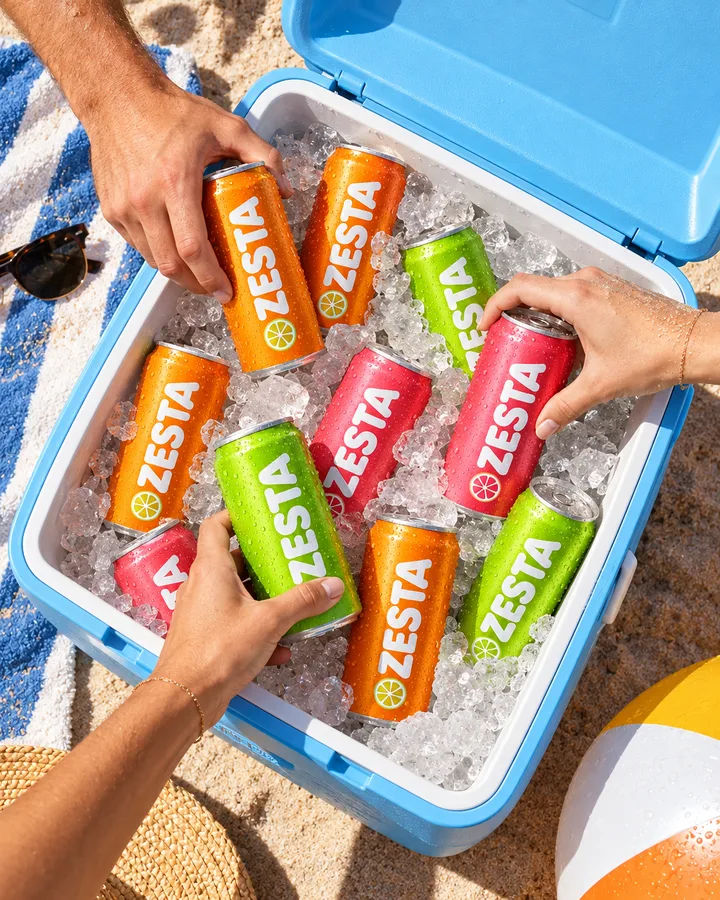
Drop in briefs, decks, price lists, photos and films. DFIRST keeps them next to your brand, your products and everything your sessions make, and Firsty reads what the work needs, with the source to show for it.
Five files dropped in, a session’s picture filed by itself, and a price found with its source.
Your uploads sit next to your Brand DNA, products, competitors, trends and references, in folders that already make sense.
Every picture, film and document a session makes lands in Outputs with a name that says what it is.
Point to a file in a prompt, or ask a question and get an answer with the file and page it came from.
Brand DNA, Products, Competitors, Trends, References, Outputs and Sessions are filled for you. Uploads is your own space: make folders, rename, move, duplicate, tag, copy a link or download a folder as a ZIP. See it all as a list, a grid or a gallery.
Drop files anywhere, or pick the folder they belong in.
Up to 512 MB per file, from photos and films to decks and spreadsheets.
Search everything with ⌘K: names, descriptions, tags and the text inside text files.
Pictures, films, sound, PDFs, Word and Excel files, CSV tables, Markdown and web pages open in DFIRST, with arrows to step through the folder. Everything else can be downloaded with one click.
Spreadsheets as tables, PDFs page by page, films with sound.
One viewer for every file, the same look everywhere.
| Product | Size | Price | Stores |
|---|---|---|---|
| ZESTA Tangerine | 330 ml | €1.90 | Beach bars, shops |
| ZESTA Grapefruit | 330 ml | €1.90 | Beach bars, shops |
| ZESTA Lime | 330 ml | €1.90 | Shops, sports clubs |
| ZESTA Four-pack | 4 × 330 ml | €6.90 | Online, supermarkets |
Ask a question about one file or about everything you have. Firsty reads the files that matter and answers with its sources, so you can check them. In a session, add any file to your prompt with the + menu.
Ask agent on any file you are looking at.
Ask your data from search, across the whole workspace.
Sources with every answer, down to the file and page.
Sessions save what they make as they go. Outputs collects it all, newest first, and each session has its own folder from the moment it starts. Files are named after what’s in them, not “image-final-v3”.
Outputs: everything your sessions made, in one place.
Sessions: one folder per session, from the first minute.
Recently added: only the files you brought in yourself.
 maya-on-the-court-3f9a2c1d.jpg
 bus-stop-poster-tangerine-81c2.jpg
 tangerine-splash-6s-02ae.mp4
 picnic-by-the-sea-4x5-77b1.jpg
 four-pack-terrace-c90e.jpg
 beach-bar-sunset-5d3a.jpg
Deleted files wait in the Trash for thirty days, with how long each one has left. Restore puts a file back where it was.
Restore with one click, back to its folder.
No Empty trash button, so nothing disappears in a hurry.
What you put in the Data Room is there to do your work, and nothing else.
Each company’s files live in their own space. Every request is checked against who you are, and file links expire after a few minutes.
Files are encrypted on the way in and out, and on the disks where they are stored.
Your workspace data can be kept in the European Union.
Your prompts, files and Data Room materials are not used to train, retrain or fine-tune DFIRST or anyone else’s AI models.
DFIRST is independently audited for GDPR. View the certificate
Connect Slack to bring your team’s channel knowledge into DFIRST. Connect the other apps your team uses, and Firsty can fetch a file from them when you ask.


What people ask before they move their files in.
Pictures, films, sound, PDFs, Word, Excel and PowerPoint files, CSV, Markdown, web pages and more, up to 512 MB each. Archives such as ZIP files aren’t accepted, so unpack them first.
Search finds PDFs and Office files by their name and description, and finds text inside text files. To ask about what’s inside a PDF, ask Firsty, which reads it.
The people in your workspace. Every company’s files are kept apart from every other company’s.
No. Your prompts, files and Data Room materials are not used to train, retrain or fine-tune DFIRST or anyone else’s AI models.
It moves to the Trash for thirty days, where you can restore it. After that it’s gone for good.
Every module feeds the others, so what one learns, the next one uses.
Drop in what you already have, and the next brief, price list or campaign starts from it instead of from zero. DFIRST opens to people on the waitlist first.