






Labelling AI content under the AI Act
On 2 August 2026 the AI Act's transparency rules for content created with the help of AI start to apply. In practice: some of the material you publish should carry a visible label saying it was created or altered using AI.
In DFIRST you have a feature that applies such a label to your material in a single click — with the EU icon from the Code of Practice or with a written note.
Below is a practical cheat sheet. No articles and paragraphs, just the decisions you have to make when you publish.
Label it when
- You create a deepfake — a realistic image, audio or video showing a person, product, place or event that the audience could take for real. This also covers things that do not exist but could (e.g. a realistic AI-generated person, a visualisation of a product you do not have).
- You publish content on public matters — elections, security, health, consumer rights — and the text has not been genuinely reviewed by a human.
- AI changes the meaning of the material — it adds or removes significant elements, changes how a product looks, what someone said, or how an event unfolded.
- The material goes to print — roll-ups, posters, packaging, leaflets. Same rules, the medium makes no difference.
Beyond the material itself: if you put a chatbot in front of your customers, they must know they are talking to a machine whenever that is not obvious.
You do not need to label when
- You are in charge — a human reviews the text on the merits, and a specific person or organisation is accountable for the publication.
- AI does not materially change the message — minor corrections and fixes.
- The use of AI is obvious to the audience — the situation shown could not have happened in reality.
- It is private use — you are not publishing it.
- It is an artistic, satirical or fictional work — then it is enough to indicate the use of AI in a way that does not spoil the experience.
Editing with an AI tool is not enough on its own to require a label. No label is required for:
- colour correction,
- noise or background removal,
- upscaling,
- grammar and style corrections,
- formatting,
- ordinary editing that does not change the meaning.
How to label properly
- Visible — at first glance, on first contact with the material.
- Safest — directly on the material, not only in the post description.
- Matched to the format — images and video: a visual label, audio: an audible one.
- You can use the ready-made EU icon from DFIRST or your own wording: “Generated using AI”, “Modified using AI”.
- Levels can be combined: a label on the image + a note in the description + the AI-labelling feature of the given platform.
- Meta, TikTok, YouTube and LinkedIn have their own rules for labelling AI content. It is worth using them in addition, not instead.
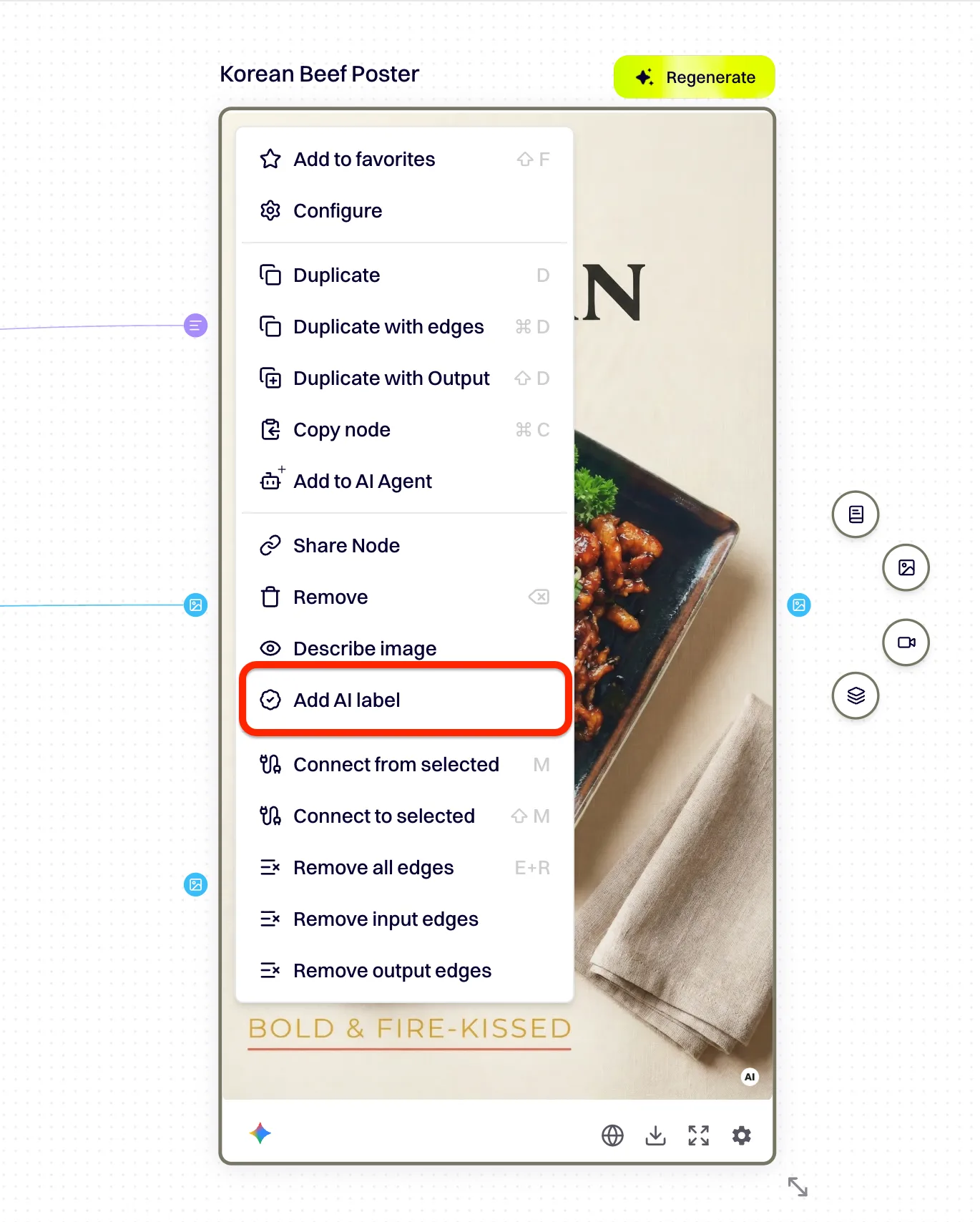
In DFIRST a built-in feature does this for you: right-click the image or video and choose “Add AI label”. The label is applied automatically.
What not to do
- Do not hide the information about AI in your terms, at the end of a long description, or on a further subpage.
- Do not use labels that cannot be read — white text on a white background, transparent, microscopic type.
- Do not show the label only for a moment at the start of a video.
- Do not count on the platform or the audience working it out for themselves.
A few practical questions
- Who makes the assessment?
- The obligation sits with whoever decides to use AI and publishes the result — that is you, also when the material is produced for you by an agency, a freelancer or an employee. DFIRST does not analyse individual assets and does not take over that responsibility. We provide the tool and make the execution easier.
- What about older material?
- Content created and published before 2 August 2026 does not, as a rule, require retroactive labelling. But if you republish it after that date or use it in a new campaign, assess it again.
- Worth following.
- Practice around the AI Act is only taking shape. We will follow announcements from the European Commission, the European AI Office and the Polish authorities, and develop the platform's features if that turns out to be needed.
The information above is general in nature and does not constitute legal advice.